Getting support is now even easier

We’re excited to share that we’ve made improvements to our support experience based on your feedback, including a new self-serve help feature, live chat assistance during deliveries, and phone support for more topics.
New support options in the Amazon Flex app
Self-serve help
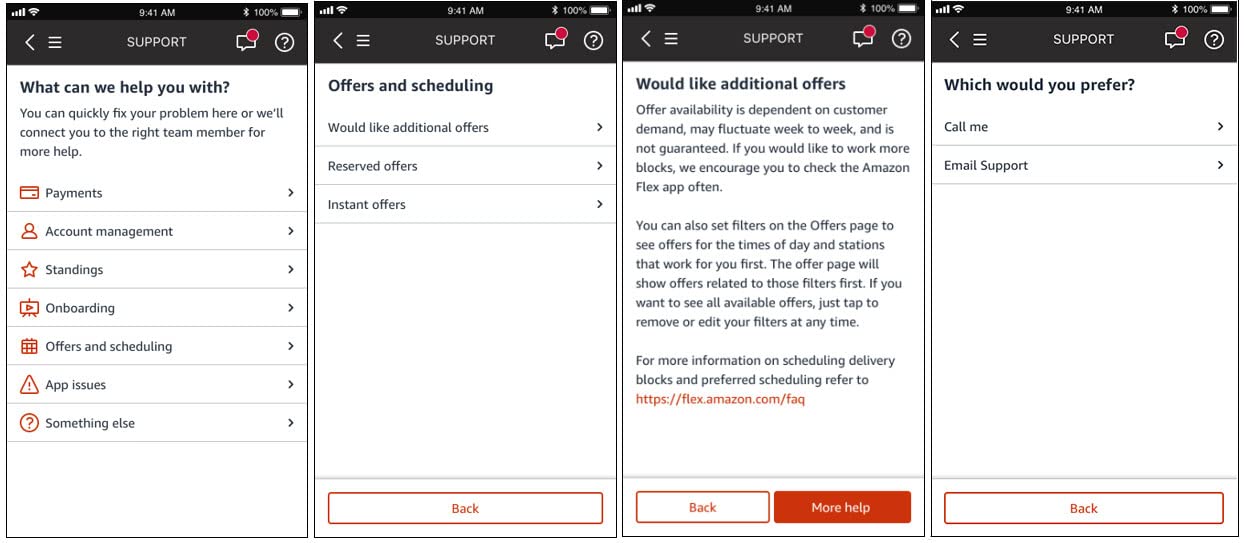
With just a few clicks in the Amazon Flex app, you can quickly find answers to popular questions on onboarding, offers, payments, Standings, and more — 24 hours a day, 365 days a year.
To access information about these topics when you’re not out delivering, click “Help” and “Contact Us” from the main menu, and the app will show you the answer to common questions on the spot. If you need additional help, you can click “More Help” for options to contact a Support team member via the app as well.
Faster support
We know that your time matters. Now you can save time if you use the Amazon Flex app to contact Support, versus dialing the toll-free number. When contacting Support through the app, the information you provide lets us connect you directly with the appropriate Support team member to answer your question. You also skip the identity verification questions, since confirmation takes place automatically through the app. This saves about a minute and a half on average per call.
Phone support for more topics
Phone support now covers even more topics. In addition to help with deliveries, you can now speak live with a Support team member about onboarding, background checks, and other account related areas. Questions about payments and Standings will continue to be supported through email.
Live chat assistance during delivery blocks
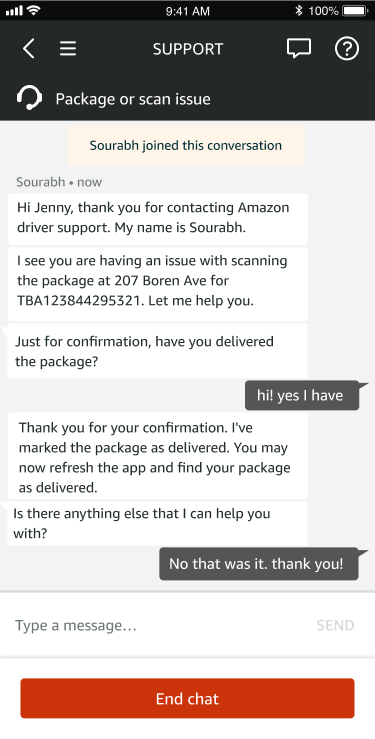
We added live chat in the Amazon Flex app for delivery assistance during your blocks. The chat option is in addition to phone support, so you can get help in the way that’s most convenient for you. Delivery partners are typically connected to Support within 30 seconds of selecting the chat or call option in the app. Here’s an example chat:
Ongoing support
In addition to the new and improved features, you can continue to access these helpful resources.
Emergency Help
The “Emergency Help” button in the Amazon Flex app gives you the option to call 911 or contact the Amazon Emergency Helpline when reporting an accident or safety concern. You can find the button in the main menu, or at the bottom of your screen during delivery blocks. If you need emergency services, always call 911 before contacting the Amazon Emergency Helpline.
Learning Portal
The Learning Portal is your go-to resource for everything related to Amazon Flex. Visit the Learning Portal through the main menu of the Amazon Flex app any time you want to get delivery suggestions, find a helpful video, or learn about all the ways to earn with Amazon Flex.
Website FAQ
The Amazon Flex website contains a Frequently Asked Questions page with basic information for popular topics related to Amazon Flex.
Toll-free phone number and email address
Contacting Support in the Amazon Flex app will give you the best possible experience, since you can connect directly to the most appropriate Support team member and save time. If you’re unable to use the app, you can contact Support in the U.S. through the dedicated toll-free number available at the bottom of the Amazon Flex website homepage, or via email using the email address associated with your Amazon Flex account.
Related Blog Posts

Thank My Driver is back!


Delivery partners can save at AMC Theatres

Thank you for 10 years of Amazon Flex
Download the Amazon Flex app
Create an account to set your schedule, see your earnings upfront, and start delivering with confidence.